

You have made a good decision by choosing our template. You can check the live demo or download the template through the button below and also Please Read this documentation carefully in order to set up your blog and please note that there’s no support for free users.
Service List Widget
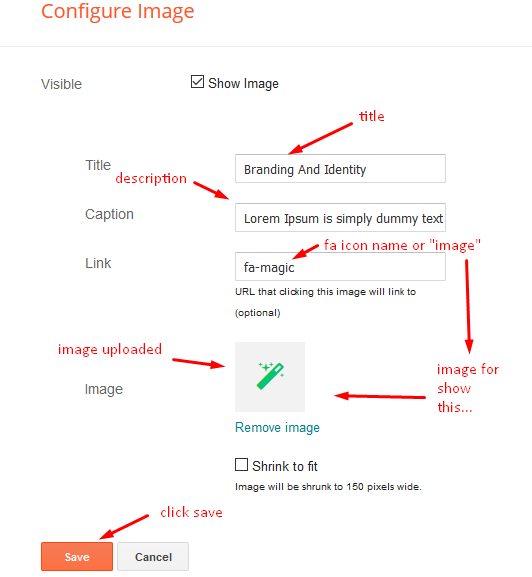
Access your blog Layout > click Edit icon > on Service List widget’s.
Widget Settings EX:
How to get FontAwesome or Remixicon icon name ??
Step 1: Go to https://fontawesome.com/v4.7.0/icons/
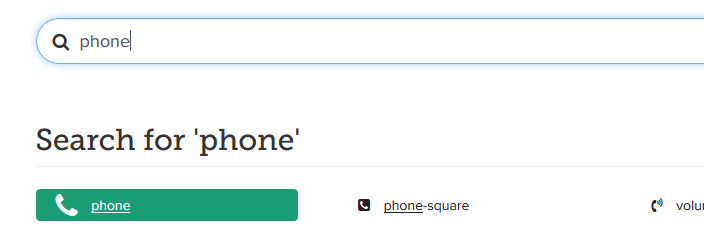
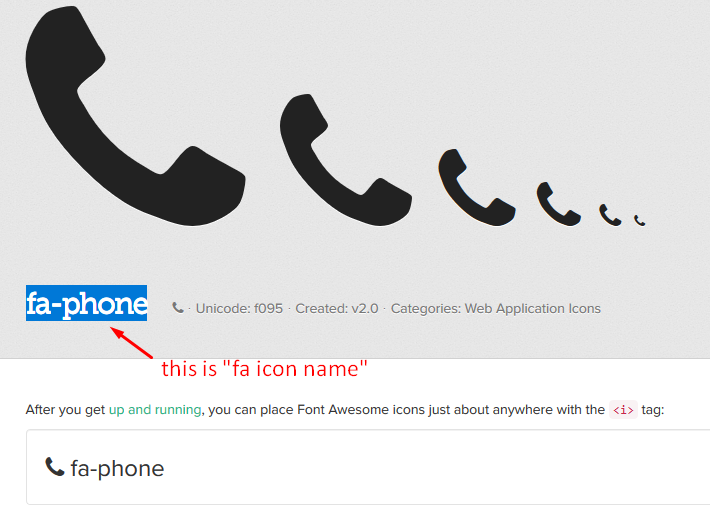
Step 2: Open icon page and copy “fa icon name”.
EX:
Pricing Widget
Access your blog Layout > click Edit icon > on Pricing Table widget’s.
Add your Subject Line as desired and use below code to ad the table.
Complete documentation
Working materials in PSD and Sketch format
* Great for beginners!
Widget Settings EX:

Access your blog Layout > click Edit icon > on Pricing Table widget’s.
Complete documentation Working materials in PSD and Sketch format * Great for beginners!
Widget Settings EX:
Post List Widget
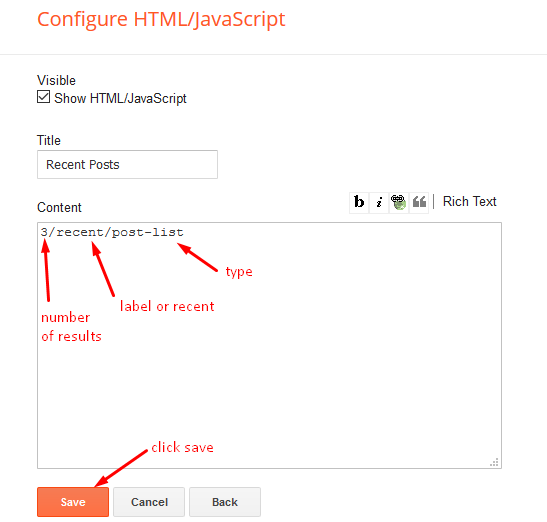
Access your blog Layout > click Add a Gadget > HTML/JavaScript on Sidebar or Footer section, you must place the following names highlighted in blue below.
Shortcode: Results number/Label or recent or random/post-list
Label Posts: 3/Food/post-list
Recent Posts: 3/recent/post-list
Random Posts: 3/random/post-list
Access your blog Layout > click Add a Gadget > HTML/JavaScript on Sidebar or Footer section, you must place the following names highlighted in blue below.
Shortcode: Results number/Label or recent or random/post-list
Label Posts: 3/Food/post-list
Recent Posts: 3/recent/post-list
Random Posts: 3/random/post-list
Post Layouts
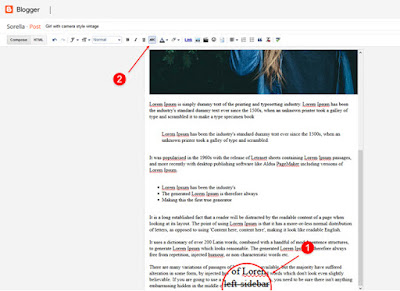
Left Sidebar: Inside the post add the text left-sidebar and add the style Strikethrough
Full Width: Inside the post add the text full-width and add the style Strikethrough
Right Sidebar: Inside the post add the text right-sidebar and add the style Strikethrough
Left Sidebar: Inside the post add the text left-sidebar and add the style Strikethrough
Full Width: Inside the post add the text full-width and add the style Strikethrough
Right Sidebar: Inside the post add the text right-sidebar and add the style Strikethrough
Social Widget (Sidebar)
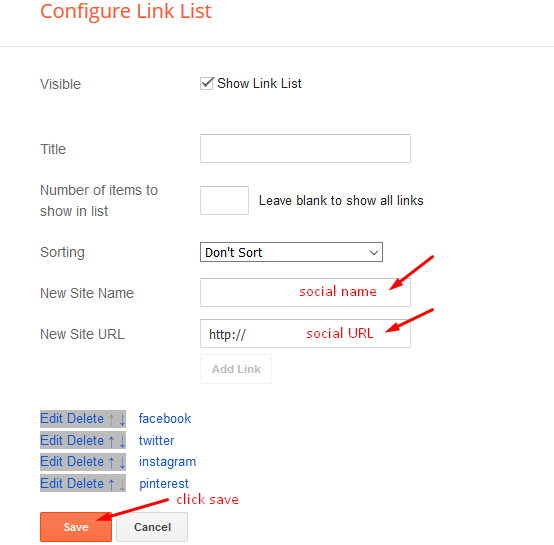
Access your blog Layout > click Edit icon on Social Widget section.
Avaliable Icons { facebook, twitter, gplus, rss, youtube, skype, stumbleupon, tumblr, vk, stack-overflow, github, linkedin, dribbble, soundcloud, behance, digg, instagram, pinterest, twitch, delicious, codepen, reddit, whatsapp, snapchat, email }
Footer About & Logo Section (Image & Text)
Access your blog Layout > click Edit icon > on About & Logo widget.
Example:

Footer Social
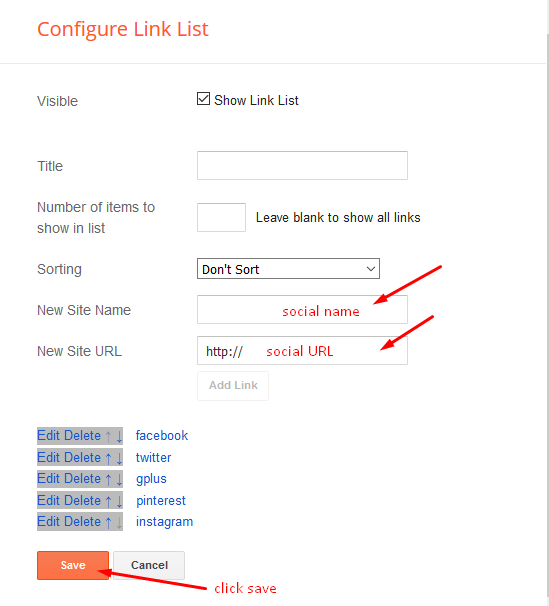
Access your blog Layout > click Edit icon on Social Top widget.
Icons Avaliables { facebook, twitter, gplus, rss, youtube, skype, stumbleupon, tumblr, vk, stack-overflow, github, linkedin, dribbble, soundcloud, behance, digg, instagram, pinterest, twitch, delicious, codepen, reddit, whatsapp, snapchat, email }
Access your blog Layout > click Edit icon on Social Top widget.
Icons Avaliables { facebook, twitter, gplus, rss, youtube, skype, stumbleupon, tumblr, vk, stack-overflow, github, linkedin, dribbble, soundcloud, behance, digg, instagram, pinterest, twitch, delicious, codepen, reddit, whatsapp, snapchat, email }
Theme Options
01 – Default Variables
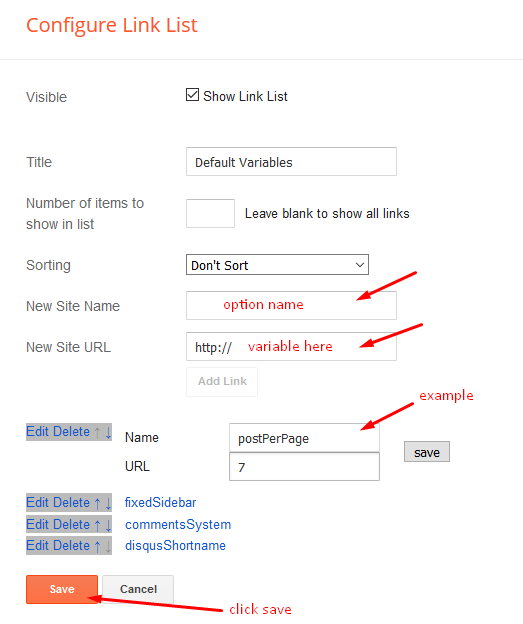
Access your blog Layout > click Edit icon on Default Variables widget.
Post Per Page: In New Site Name add postPerPage, in New Site URL add the number of results, it should be the same as the posts from the home page, after click on save button.
Fixed Sidebar: In New Site Name add fixedSidebar, in New Site URL add true or false, after click on save button.
Comments System: In New Site Name add commentsSystem, in New Site URL add the comments sytem type {blogger, disqus, facebook or hide}, after click on save button.
Disqus Shortname: In New Site Name add disqusShortname, in New Site URL add your disqus comment system shortname, after click on save button.
Facebook Page Plugin
Access your blog Layout > click Add a Gadget > HTML/JavaScript on Sidebar or Footer section, and paste the code below.
https://www.facebook.com/way2themes” data-width=”360″ data-small-header=”false” data-adapt-container-width=”true” data-hide-cover=”false” data-show-facepile=”true”>
Note: In Attribute data-href replace the link per your facebook page url.
Footer Menu
Access your blog Layout > click Edit icon on Footer Menu widget.

Customizing Your Template
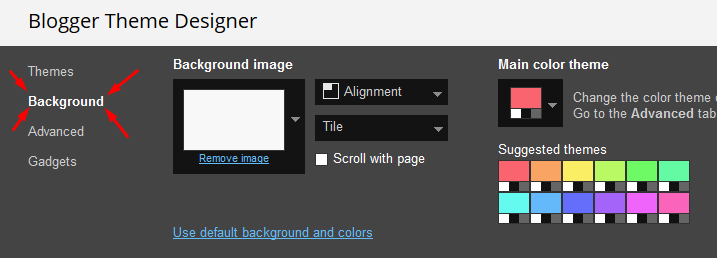
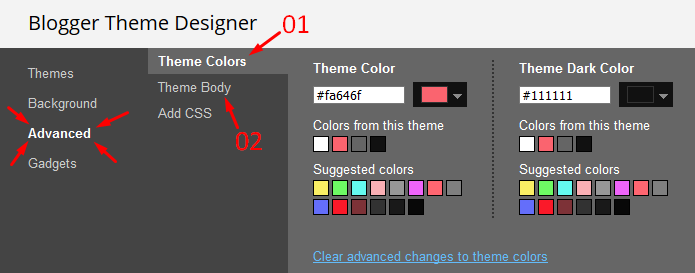
Access your blog Theme > click Customize button.
Here you can change the background (boxed version), and apply pre-defined colors
Installation And Custom Services
We provide plenty of templates for free but if you want something unique for your blog then let us create a unique design for your blog, Just tell us your needs and we will convert your dream design into reality. We also Provide Blogger Template Installation Service. Our Installation service gives you a simple, quick and secure way of getting your template setup without hassle.